
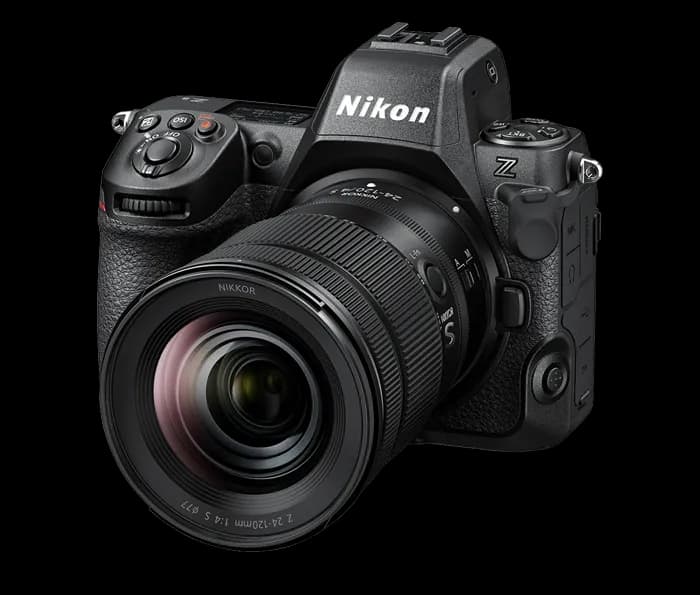
Some cameras are specialists and some are generalists, and the Nikon Z8 is the rare generalist that doesn't feel like a compromise in either direction. It carries the same stacked sensor and autofocus brain as Nikon's flagship in a noticeably smaller body, which means a single Z8 can carry a commercial stills day in the morning and a motion pass in the afternoon. For a Denver shooter who books mixed work — product, portraits, a hero video cut for the same brand — that breadth is the whole appeal.
It's not the highest-resolution body on the rental shelf and it isn't a dedicated cinema camera. What it is, is the body most likely to handle whatever a given week throws at it without you renting a second system.
What the Z8 is
The Z8 is Nikon's 45.7-megapixel full-frame mirrorless body on the Z mount, built around a stacked, backside-illuminated CMOS sensor. The numbers that matter most on a studio or commercial set:
Nikon Z8 — key specs
- Sensor
- 45.7MP full-frame stacked BSI CMOS (FX)
- Mount
- Nikon Z (F-mount via FTZ II adapter)
- Stabilization
- In-body 5-axis, up to ~5.5 stops (6.0 with Synchro VR lenses)
- Video
- 8K UHD up to 30p · 4K UHD up to 120p · internal N-RAW / ProRes RAW HQ
- Stills burst
- Up to 20 fps RAW; high-speed JPEG modes well beyond
- Cards
- Dual slot — CFexpress Type B/
XQD + SD UHS-II - Viewfinder
- Blackout-free 3.69M-dot OLED, up to 120 fps refresh
Forty-five-plus megapixels lands in the same productive sweet spot as the Canon EOS R5: enough resolution to crop hard, deliver a hero plus tight detail crops from one frame, and print well past anything a brand or catalog typically needs — without the file weight and lighting demands of a medium-format back. If a job genuinely calls for 100MP-plus, that's a Phase One or Fujifilm GFX conversation, but those are the exception, not the default.
Why hybrid shooters choose it
Autofocus that holds a paid day together
The Z8's subject-detection autofocus — trained with deep learning to recognize people (eyes and faces), animals, and vehicles — is the quiet reason it feels relaxed to shoot. On a portrait or look-book day you keep your attention on the talent and the light while the camera keeps the eye sharp. Fewer soft frames is fewer reshoots, and on a billed day that's money you keep.
Real video, not a token mode
Plenty of stills cameras shoot 'video' as an afterthought. The Z8 records 8K UHD up to 30p and 4K up to 120p, with internal RAW (N-RAW and ProRes RAW HQ) for shots you want to grade hard. Oversampled 4K from the full sensor is clean and detailed, and 120p gives you genuine slow motion for a product beauty pass. For long-form or higher-end cinema you'd still reach for a dedicated body like the Blackmagic URSA, but for social-first and branded deliverables the Z8 covers the still and the clip from one setup.
One sensor design, stills and motion both
Because the sensor is stacked, readout is fast — which shows up as minimal rolling-shutter skew on quick pans and a fully electronic shutter you can lean on all day without mechanical wear. That same speed is what feeds the high burst rates and the blackout-free viewfinder, so the camera never feels like it's catching up to the action in front of it.
How it fits a studio workflow
Commercial work lives on the tether, and the Z8 tethers cleanly over USB-C into Capture One or Nikon's own NX Tether, so every frame lands on a big screen the moment you shoot it. Art directors approve on the spot, you catch a stray reflection or a wardrobe wrinkle in real time, and nobody discovers a problem back at the edit. Our studio tether station is built around exactly that loop, and the dual card slots let you write a backup while you shoot so a card never becomes a single point of failure.
The glass is where the body earns its keep. A few Z-mount pairings that carry most studio days:
- Z 24–70mm f/2.8 — the do-everything zoom that ships in our kit; one lens for fast-moving content days where swapping primes costs you setups.
- Z 70–200mm f/2.8 — flattering compression for portraits and beauty, and the reach to shoot tight product without crowding the set.
- Z 180–600mm — for when you need serious reach on a large set, wildlife-style detail, or compressed background separation.
Practical setup considerations
A couple of things worth planning for before the shoot day. 8K and high-frame-rate 4K write large files fast, so budget for fast CFexpress Type B cards and storage to match — our kit includes a 256GB SD card, but for sustained high-bitrate video you'll want CFexpress in the primary slot. The stacked sensor and electronic shutter pair well with strobes, but always confirm your flash-sync approach for the look you're after rather than assuming. And if you're shooting a long handheld motion day or want better balance with the 70–200mm and 180–600mm, the optional vertical grip adds a second battery and a more comfortable vertical hold.
When to rent it instead of buying
Bodies depreciate and firmware moves on; the camera you buy this year is a step behind next year's. Renting the Z8 makes sense when:
- The job pays for the tool — bill the rental to the production and hand it back when you wrap.
- You need a matched second body for a multi-cam stills-and-motion day without owning a backup.
- You're a Canon or Sony shooter who wants Nikon's color and the Z glass for a specific job without switching systems.
- You shoot hybrid occasionally — a few campaigns a year doesn't justify owning a flagship-class body.
Our Z8 rents as a complete kit — body, Z 24–70mm f/2.8, two batteries, charger, a tether cable, a 256GB card, and a case — so you can pick it up and shoot, or add the 70–200mm, the 180–600mm, or the vertical grip à la carte. Body-only is available if you're bringing your own glass, and the whole order lives in our camera and lens rental inventory.